Showing posts with label Facebook. Show all posts

Wednesday, March 16, 2016

Login with Facebook using PHP with v5 SDK

It has been a long time since my last post about Facebook. Many things have changed since. This time I want to talk about the new version of Login PHP SDK for Facebook.

The latest version of SDK can be found here.

I think I can skip to codes directly as all the steps to install the SDK and obtain the app_id and app_secret can be easily found in the internet. But I need to point out the errors you may see if something goes wrong. If you see the following error:

Parse error: syntax error, unexpected '[', expecting ')' in ...

You need a PHP 5.4 or higher version to avoid this error.

Instead, if you see this:

Cross-site request forgery validation failed. The "state" param from the URL and session do not match.

It means your app_id and app_secret are not registered to run in the current domain.

Facebook required us to run the login authorization process in two parts: the login link page and the call-back page. The login page will produce a link with new access token to comply with OAuth 2.0 flow. The next page is to process the call-back from Facebook with valid access token so as to do anything with the verified login such as accessing the ID or email address.

As my philosophy is always to make things short and simple as programmers will not like anything too windy, I combined the two parts into one PHP script. Here is the hybrid script:

<?php

session_start();

require_once __DIR__ . '/facebookV5/autoload.php'; // Please point to your facebook SDK autoload.php

$fb = new Facebook\Facebook([
  'app_id' => 'Your App ID',
  'app_secret' => 'Your App Secret',
  'default_graph_version' => 'v2.5',
]);


if (!isset($_GET['code'])) { // If it is a callback, you will get 'code' as query string.

  $helper = $fb->getRedirectLoginHelper();

  $myURL = '{Your Login URL}'; // The URL to this very script such as http://yourdomainname.com/this_hybrid_login_script.php
  $permissions = ['email']; // Optional permissions
  $loginUrl = $helper->getLoginUrl($myURL, $permissions);

  //header( 'Location: ' . htmlspecialchars($loginUrl) ); PLEASE DO USE REDIRECT WITH PHP HEADER! Somehow it doesn't work well with Facebook OAuth 2.0 flow
  echo("<meta http-equiv='refresh' content=\"0;URL='". htmlspecialchars($loginUrl) ."'\" />");
  exit;
}
else { // This is the call-back section:

  $helper = $fb->getRedirectLoginHelper();
  try {
    $accessToken = $helper->getAccessToken();
  } catch( Facebook\Exceptions\FacebookSDKException $e ) {
    echo $e->getMessage();
    exit;
  }

  if (isset($accessToken)) {
    $_SESSION['facebook_access_token'] = ( string ) $accessToken;

    $fb->setDefaultAccessToken($accessToken);

    try {
      $response = $fb->get('/me?fields=email');
      $userNode = $response->getGraphUser();
    } catch(Facebook\Exceptions\FacebookResponseException $e) {
      echo 'Graph returned an error: ' . $e->getMessage();
      exit;
    } catch(Facebook\Exceptions\FacebookSDKException $e) {
      echo 'Facebook SDK returned an error: ' . $e->getMessage();
      exit;
    }

    $me = $response->getGraphUser();
    echo "Your Facebook Email: ".$me->getProperty('email');

    // You now can use the email for the rest of the login process

    exit;
  }
  else if ( $helper->getError() ) {

    // Facebook Login Error

    echo( $helper->getError()."<br>" );
    echo( $helper->getErrorCode()."<br>" );
    echo( $helper->getErrorReason()."<br>" );
    echo( $helper->getErrorDescription()."<br>" );
    exit;
  }

  echo("Access Token cannot be obtained.");
  // You need to debug if you see this as it shouldn't reach here.
  exit;
}

?>


This is a 2-in-1 script. I use the query string 'code' as a signal to decide where it is a call-back from Facebook or it is the first-run before linking to Facebook. If everything goes well and your browser has not run this PHP code before, you will encounter a page where Facebook will ask for your permission to run this PHP app. Here is an example of how it looks like:


After continuing this authorization process, you will not see this page again unless you change the app_id and app_secret. Enjoy logging in with Facebook!

Read More »

Thursday, December 18, 2014

Latest Facebook Share Method for HTML (Dec 2014)

The Facebook share method has gone through a lots of changes since my last post long ago. Here is the latest update. Please note that these codes may not be working by the time you use them as Facebook updates its coding requirements very often.

Anyway, here are the codes:

<html>
<head>
<meta name="description" content="Welcome to my website! My phone number is 1234567! Thank you!">
<meta property="og:title" content="Your Facebook Post Title" />
<meta property="og:type" content="website" />
<meta property="og:image" content="http://yourdomainname.com/pic1.jpg" />
<meta property="og:url" content="http://yourdomainname.com" />
</head>
<body>

<script src="http://connect.facebook.net/en_US/all.js#xfbml=1"></script>

<div id="share">
<fb:share-button class="meta">
<link rel="image_src" href="http://yourdomainname.com" />
<link rel="target_url" href="http://yourdomainname.com" />
</fb:share-button>
</div>

</body>
</html>


Note: Please note that you need to own the website in order to place these codes in the index page. If you don't own the website or domain, the share information will not show up correctly. Secondly, if you run these codes on the "localhost", the share button won't show up. Please note that you need to change those in blue to your own information.

If the information doesn't show up correctly or you want to update your Facebook share information, you need to use Facebook linter or debugger. Here's the link: https://developers.facebook.com/tools/debug/. The linter/debugger link has also changed since my last post. Please also note that you may need to press "Fetch new scrape information" a few times for the system to update.

Read More »

Saturday, September 7, 2013

Latest Method to Change Facebook Like Box Border Color

As of today, this method still works. This may not work in the future as Facebook changes its support every now and then.

Anyway, here are the codes:


The CSS:
.fb-like-box {
  width: 348px;
  height: 248px;
  overflow: hidden;
  position: relative;
  border: 1px solid #dddddd;
}

.fb-like-box .dummyBox {
  margin: -1px 0 0 -1px;
  border: 0px;
}


The HTML:
<div class="fb-like-box">
<div class="dummyBox">
<fb:like-box width="350" height="250" colorscheme="light" show_faces="true" stream="false" header="false"><iframe width="350px" height="250px" frameborder="0" allowtransparency="true" scrolling="no" title="fb:like_box Facebook Social Plugin" src="http://www.facebook.com/plugins/like_box.php?color_scheme=light&amp;header=false&amp;href=http%3A%2F%2Fwww.facebook.com%2Fpages%2F[Your FB Page Path]&amp;locale=en_US&amp;show_faces=true&amp;stream=false&amp;width=350&amp;height=250" style="border: none; visibility: visible; width: 350px; height: 250px;"></iframe>
</div>
</div>


Those in red are the ones you might want to change according to your preference. Those in green are the important settings to pay special attention to and also the locations where the magic comes from. Basically it is to enclose the FB iframe with two DIVs. One is to enclose to FB iframe with purposely 1 pixel smaller on each side to cover up the original FB like box border. The 2nd DIV is to shift the other DIV to upper left hand corder by 1 pixel using "margin: -1px 0 0 -1px;".

Hope you like this little trick. Enjoy!

Read More »

Thursday, January 31, 2013

Facebook Fan/Like Box External CSS No Longer Supported?


Updated: 8th of September 2013
After several months of waiting, FB no longer supports external CSS as of today. Here's my alternative to change the border color of the like box:
http://webtrick101.blogspot.com/2013/09/latest-method-to-change-facebook-like.html


Updated: 27th of February 2013
As of yesterday, this method is no longer working. Let's wait for a few more days and see if Facebook turns this feature back on.


Updated: 1st of March 2013 (Not Working Anymore)
If you use http://www.facebook.com/plugins/likebox.php instead of http://www.connect.facebook.com/widgets/fan.php as your like box script, you can still control the color of the iframe by adding the border style to it. As of now, the external CSS is still not supported.


Actually it is still supported but the method used has changed.

Here's the latest format/method:


<iframe style="height: 400px; width: 310px; border: 0" src="http://www.connect.facebook.com/widgets/fan.php?href=[FAN PAGE URL]&colorscheme=light&show_faces=true&stream=true&header=false&css=[CSS URL]"></iframe>


Instead of using <fb:fan> tag, iframe is used. As for the [FAN PAGE URL], you can put something like http%3A%2F%2Fwww.facebook.com%2FmyFBpage. Please note that %3A means ':', %2F means '/'. The same goes for the CSS URL. Just point to a css file.

Enjoy!
Read More »

Sunday, December 16, 2012

Check Out Facebook Friends with Specific Birthday Month FQL


As in my previous post, here's the modified version to list out friends with birthday in the month of May in Facebook.


SELECT name,uid,birthday_date FROM user WHERE uid IN (SELECT uid1 FROM friend WHERE uid2=me()) AND strpos(birthday_date,'05') = 0


You can change the month (highlighted in blue) to some other values.

Read More »

Saturday, December 15, 2012

Check Out Facebook Friends with Most Mutual Friend FQL

As in my previous post, here's the modified version to list out friends with most mutual friends in Facebook.


SELECT name,uid,mutual_friend_count FROM user WHERE uid IN (SELECT uid1 FROM friend WHERE uid2=me()) ORDER BY mutual_friend_count DESC


Read More »

Check Out The Seniors Among your Facebook Friends Using FQL

As we know that we are all assigned an ID as we signed up a Facebook account. The account grows bigger as time goes by. We can tell from this little hint who signed up the FB account earlier by comparing the user ID.

Here's the FQL used to generate the list according to the time first joined the social network:


SELECT name,uid FROM user WHERE uid in (SELECT uid1 FROM friend WHERE uid2=me() ORDER BY uid1 ASC)


As in the earlier post, you can try out this FQL query here:

https://developers.facebook.com/tools/explorer

Read More »

Friday, December 14, 2012

Check Out Facebook Friends with Most Friend FQL

Here's a fun FQL to find out who among your FB friends has the most friends:


SELECT name,friend_count,mutual_friend_count FROM user WHERE uid in (SELECT uid1 FROM friend WHERE uid2=me()) ORDER BY friend_count DESC


Just copy and paste from the above query codes and paste it to:

https://developers.facebook.com/tools/explorer


I also added the mutual_friend_count for more fun. You can add as many objects you want to "query" from the table documentation here:

http://developers.facebook.com/docs/reference/fql/user

The Output? Of course, the data in JSON format.

Read More »

Tuesday, November 29, 2011

Facebook Funny Little Trick

There are numerous posts I find it funny.

It is using the Facebook wall to post something funny using the UID such as

@[84786553145:0]

After you paste on Facebook wall and it will appear as "Kiss Me!".

It's actually showing the username of the Facebook page "Kiss Me!" and people may not be aware of this when they paste it onto their wall.

But you need to add something like '+' sign to something like @+[84786553145:0] when you send the instruction to paste it to your friends wall and tell them to remove the '+' sign before posting. Otherwise, the "Kiss Me!" will appear in your instruction to your friend instead of the trick codes.

Basically here's the syntax to post username on Facebook wall:

@[Facebook UID:Any Number]
Read More »

Monday, November 21, 2011

CSS font used by Facebook

Now the fonts used by Facebook become the favorite for many. If you do a view source, you'll see this CSS setting:


font-family:"lucida grande",tahoma,verdana,arial,sans-serif;
font-size: 11px;


The color tone is not entirely black and it is a bit towards grey.
Read More »

PHP: $_REQUEST or $_POST or $_GET?


If you are very sure of the return string type, use $_POST['myStringKey'] for POST data and $_GET['myStringKey'] for GET data.

If you are not really sure (ex. it's from a third party source such as Facebook), use $_REQUEST['myStringKey'].


Read More »

Sunday, November 20, 2011

The Facebook Avatar Thumb Nail URL


http://graph.facebook.com/[Facebook Profile ID]/picture


This link will be redirected to the actual jpg file in one of the servers of facebook.
Read More »

Sunday, October 30, 2011

Setting Up A Facebook App Update (Oct 2011)

Here we go:

1) Go to http://developers.facebook.com/ and click on Apps as circled below:


2) If you are here the first time, you will be asked for permission.


3) You may also be asked about your phone number to verify your fb account. Do it before the next step.


4) You’ll see the following wizard if you are here the first time. If you’ve set up any other apps before, you’ll be shown a different page which is the summary of the latest app you last developed.


5) Click on “Create New App” and you’ll see this:


Enter the App Display Name something like “Birthday Calender”. App Namespace is important as it is going to be your app URL: http://apps.facebook.com/[your app name space]. It’s like email name, the name you chose has to be available on the server before you can proceed. Check the agreement and press Continue after you are done.


6) You’ll see the App Basic Setting page:


The App (Display) Name and the Namespace are already filled up automatically. You just need to fill up the email and also the website. Please leave the http:// out from the App Domain. You just need something like mydomain.com and then press Enter. Please don’t click the mouse instead of pressing Enter. It won’t work. You can also add an icon in A so that it looks more professional.


You also need to fill the Website and App on Facebook. They can be something like:

http://www.yourdomain.com/fbapps/your_app_namespace/

If you don’t fill up the Secure Canvas URL, you’ll see this warning:


If you don’t have a secure server to run with your app, your account won’t be able to test the app but someone else account can still be running. (as of today 30th of October 2011)

If you don’t have a secure URL set up, you’ll see this when you run your App:


Things change very often and quickly in Facebook. I was allowed to run testing with my account even if I don’t have a secure server to run with a week ago. Now it’s different a week later.


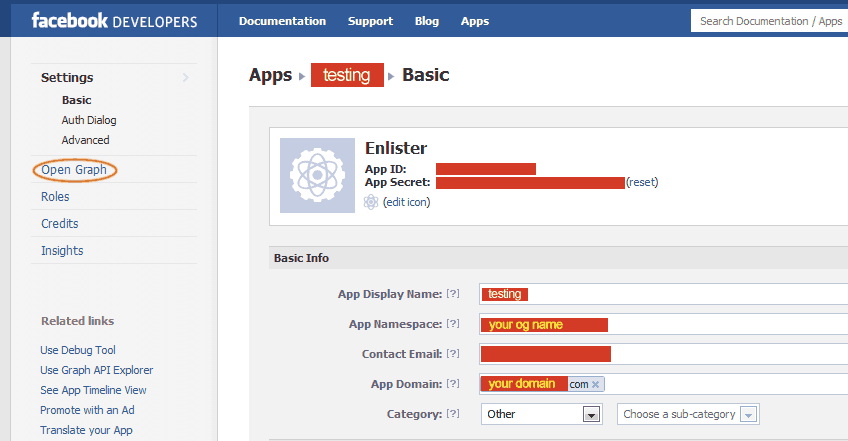
7) Then click on Open Graph on your upper left:


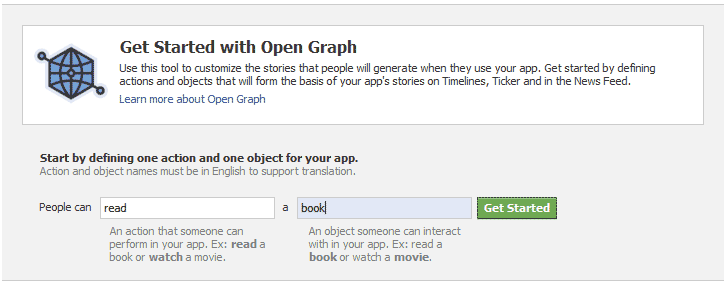
If you run Open Graph for the first time, you’ll see the wizard:


I just put “read” as my action and book as my object. Then I clicked on “Get Started”.


There are 3 parts to it: 1) Action 2) Object 3) Aggregations


I now in Step 3 skipped Step 2 as I've already entered the object in the Wizard window. Anyway, you can change it later on as it is not really important now.


Just press Save and go to the Open Graph Dashboard.

8) Actually the app account is already set up at this point. If you want your app to be able to be published to the public, you’ll need approval. You’ll need to submit your Action (with proper aggregations to back it up) to be approved.

Facebook cannot guarantee that your submission will be approved as your app has to be very “professional” according to the document published.

You can stop here if you don’t need your app to go public.
.
.
.
.
.
.
.
.
.
.
.


If so, let’s continue.


Before the submission, you’ll need to get the aggregations set up properly or you’ll see this error after you click on Submit:


“ No Aggregations created for this Action Type. Please create a completed Aggregation populated with sample data before submitting for review.”

In order to avoid this problem, you’ll need at least a good aggregation set up. Click on Preview on the Aggregations section as circled above.


Click on Add New for the Preview Action:


Please make sure you give it a dummy Sample Image by simply getting any image URL and click on the Sample List and a pull down menu will show “Add Custom URL” and a “http://” will appear. Please enter a valid URL anything other than facebook.com. Click on Create after you are done.

Then click on Add New for the Preview Objects. This is the crucial part:


You basically need to fill up everything. DON’T leave anything blank. Click Create after you are done.

Now, here’s the final trick:


Please DO click on the Debug! You’ll see this:


If you don’t see any problem here, you are all set! Go back to the Open Graph dashboard, you’ll see this after you click Submit for the “Read” action:


The error about aggregations is gone and you are now ready to submit your action to be approved by Facebook! Congratulations!


Ya, forgot to tell you how to run the app.

Go here:


You can click on App on the top panel to reveal the summary page. The Canvas Page URL is your App's wall/profile page.


You can also click on "View App Profile Page" on the side panel.
Read More »

Friday, October 28, 2011

Facebook App Using OAuth 2.0 and Open Graph Profile


This is the path:

http://www.facebook.com/apps/application.php?id=187586184649186&sk=wall

Note: this is for educational purposes and the look and feel might not look professional.

App Feature:
- Convert your friends' contact info into csv file
- You can configure particulars you like to add to the list (csv file)
- Good for backing up your FB contacts
- The csv file can be opened by spreadsheet software such as Excel and OpenOffice. (You need to follow the instruction to open it correctly)
- The texts are international (support most languages)


Internal Feature (Programming wise):
- It's OAuth 2.0 compatible
- Uses JSON (Open Graph) data format
- Uses FQL to run the data collection (Speed Up the Process)
- Uses Open Graph to get basic info of the user
- Compatible with IE7 (known to have problem with OAuth 2.0)
- Uses scope to open up permissions to gather protected graph info by obtaining the right access tokens
- Runs in PHP only
- UTF-8 compatible
- Email and Phone number will not be supported as FB will deprecate it any time


Special Treat:
- Those who donate will receive the full source code with explanation upon request. Please give me a kick if you really need this source code after you donate. Time is money. Installation Guide will also be provided but you need to run it on your own hosting and FB (developer) account. Hopefully, by obtaining the source code and install on your FB account, you can kick start your FB App development!

The documentation will also address the IE problem. Actually IE is not the culprit as it is just enforcing very strict anti CSRF (Cross-Site Request Forgery) rules.
Read More »

Monday, October 17, 2011

Add Action to Your Facebook App Before Submission for OAuth 2.0 Open Graph API

Please check out my latest update here:

http://webtrick101.blogspot.com/2011/10/setting-up-facebook-app-update-oct-2011.html


Some info may not be applicable any more. This latest update also covers the aggregations part in more detail.


Many things have changed since the October 2011. With the Oauth 2.0, access_token is now a must. Even the hosting for the App, App's action and object are now needed to gain the access and approved by Facebook before it can be published to the world.


But I only touch on adding a legal action to your FB app here. Although there is still a long way for an App to be approved. The official doc is here:

http://developers.facebook.com/docs/beta/opengraph/tutorial/

But I find it to be a bit out of touch. That's why I decided to blog my experience here so that I can remember what I just did.


You need to fill up the App info completely before the setting up the Open Graph (circle in red). Note that, App Namespace is important and it has to be unique across facebook network. Just like applying a username for an email. Next, you also need to specify a App Domain or your open graph won't work. DO NOT include "http://" or facebook will just ignore your entry. Just yourdomain.com is sufficient. Press enter right after the entry and press save at the bottom of this page.


The Open Graph (Circled in Red)
I will only touch on the way I used to add a legal action to the app although there are still steps away from getting an approval for the FB Graph usage on your app.

If you are configuring this for the first time, FB will direct you to a wizard.

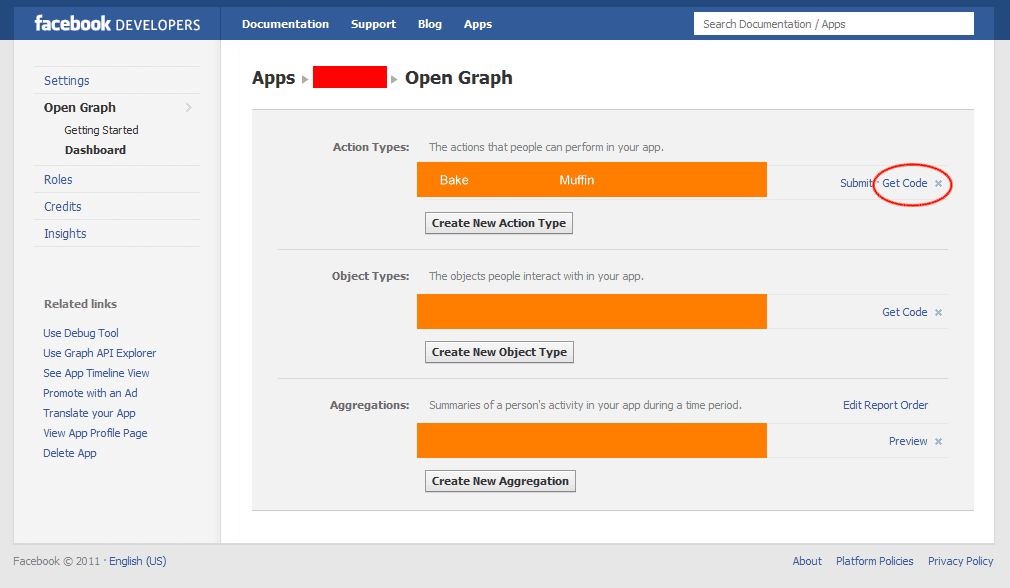
If not, you can go to the dashboard to reconfigure. Here's the screen shot:


I use "Bake" as my action and "Muffin" as my object for this example.


Here's the HTML to kick this "Bake Muffin" action to the FB system (not yet approved but you need this initial verification): (I modify from the example in the tutorial and some codes from I got from stackoverflow here and there. Credits go to whoever I copied from pieces here and there)


<html xmlns="http://www.w3.org/1999/xhtml" dir="ltr" lang="en-US"
xmlns:fb="https://www.facebook.com/2008/fbml">

<head prefix="og: http://ogp.me/ns# [Your App Namespace]:
http://ogp.me/ns/apps/[Your App Namespace]#">
<meta property="fb:app_id" content="[Your App ID]" />
<meta property="og:type" content="[Your App Namespace]:muffin" />
<meta property="og:url" content="[This URL]" />
<meta property="og:title" content="Any title" />
<meta property="og:description" content="Any description" />
<meta property="og:image" content="Any image (url)" />


<script type="text/javascript">
function postkick()
{
FB.api('/me/[Your App Namespace]:bake' +
'?muffin=[This URL]&access_token=[Your Access Token]','post',
function(response) {
var msg = 'Error occured';
if (!response || response.error) {
if (response.error) {
msg += "\n\nType: "+response.error.type+"\n\nMessage: "+response.error.message;
}
alert(msg);
}
else {
alert('Post was successful! Action ID: ' + response.id);
}
});
}
</script>

</head>

<body>
<div id="fb-root"></div>
<script src="http://connect.facebook.net/en_US/all.js"></script>
<script>
FB.init({
appId:'[Your App ID]', cookie:true,
status:true, xfbml:true, oauth:true
});
</script>

<fb:add-to-timeline></fb:add-to-timeline>

<h3>
<font size="30" face="verdana" color="grey"> Kicking Bake Muffin Action </font>
</h3>


<form>
<input type="button" value="Kick In" onclick="postKick()" />
</form>


</body>
</html>


Please pay attention to those in red. Slight mishap may render the entry unsuccessful. Use this HTML and run it from the domain you specify in your App Domain.

You can get the access token from the "Get Code" in your Open Graph Dashboard (Action section). You'll see this:


You'll see this after you click on "Kick In" if it is successful:


If not, you'll get the error message telling you what went wrong.

Good luck!


P.S.: Sometimes you don't need the namespace in here:

<meta property="og:type" content="[Your App Namespace]:muffin" />

Please stick to the "Get Code" from the "Object Type" for your object.


After following the doc, I see this (after clicking "See App Timeline View"):


Maybe this is the reason why I keep on getting error during submission (I do see a dateline of 24th of October 2011 there):

No Aggregations created for this Action Type...

P.S.: Now out of a sudden, I am allowed to press "Continue" in the "Submit an Action Type for Approval". I did nothing special except adding another simple aggregate that shows OK in "The New Auth Dialog".


More tips for Facebook Open Graph aggregation:


If you see those signs, congratulations:


Read More »

Wednesday, July 27, 2011

How to Set Facebook Landing Page to Your App?

Can you do this? Yes and no.

Yes, it is only applicable to those who haven't "LIKE" your page/app.

No, if your fan has already "LIKE" you. They will go to the page's wall instead.


You can refer to how to set up the app in my earlier post if you haven't made one yet. If you already have an app in place, you can easily go to your intended facebook page and then click on "Edit Page" in "Get Started" or on the wall on the top right.


You may be landed on the "Manage Permissions" link. If not, go there. Then find your app in the Default Landing Tab options. Your app should be there. After that, save your changes.

Once again, if you already "LIKE" your own, you go to WALL directly. Log out and go the facebook page, you'll be landed on the app you just picked.


Read More »

Create a Facebook iframe App/Tab (Formerly known as Fanpage Static FMBL Tab)


Many changes have been made recently by facebook and here's the official facebook tutorial on this subject:


https://developers.facebook.com/docs/beta/opengraph/tutorial/


Many steps in the following are no longer applicable.


Ever since March 11, 2011, Facebook has phased out the Static FBML support and introduced the new iframe App/Tab.

As of today 27th of July, 2011, the following steps are taken to make this work. I cannot guarantee compatibility in the future as Facebook changes its functionality very often.


Note: the FBML is no longer required. BUT you need to have your web page in HTML hosted somewhere and port it into facebook as app using the following method.


Anyway, here are the steps I found it working:


Step 1:

Go to :

http://facebook.com/developers

If you are here for the first time, you will be prompted for permission like any other Facebook apps.


Step 2:


In the developer's page, click on "Create New App" on the upper right corner. The “New App” mini window will pop out in the middle.

Then, enter App Name, Locale, and agree to the Facebook Terms. You will then be asked to complete a Captcha text recognition after that.

Note: Make sure your Facebook account is verified by mobile phone or credit card or you'll be asked to do so before proceeding further.


Step 3:

You are directed to "About - Basic Info" of this App Profile Edit control panel. Fill up the basic info such as Description, Category, Apps Icon image, Contact info, etc.

You are also given the app id and app secret here.


Step 4:

Click on “On Facebook – Canvas Settings” on the left panel as shown below.


You are then to fill up the App info such as Canvas Page, Canvas URL, Secure Canvas URL, Iframe Size, Bookmark URL, Social Discovery, Tab Name, Tab URL, etc.


The most important part is the Canvas URL which points to the URL you want it to appear in the iframe of facebook.

Remember the “http://”. The web address has to be complete. You can also include query strings in the URL but they may be treated as POST string but send with GET format. A bug that facebook has to fix someday. If you are using PERL CGI lib to capture the form data, you may need to do some tweaking.

Someone mentioned that the URL has to end with a "/". Not sure about that.

The 2nd important part is the Tab URL, it is like PATH to the Canvas URL. For root access to the web page, you may be tempted to leave it blank. But I advise you to put a “&” sign there. Leaving it blank may cause error and your app won’t show up.


Step 5:

Click on "View App Profile Page" on lower left of the facebook developers page (as shown in the image above also). You can test your settings to see if there is any error by clicking on the ”Go to App" button on top in your App Profile Page.

If it is working, you can port the app to any of your facebook page. Just click on "Add to My Page" (as shown below). Walla!


You may need to obtain permissions to your app by getting an access token. A simple click will do if you are asked to get one.


If you make a mistake somewhere, you’ll get this error which means you need to go back to http://facebook.com/developers (click on Edit below “Create New App”):


The app "xxxxxxxxxxxxxxxxxx" is temporarily unavailable due to an issue with its third-party developer. We are investigating the situation and apologize for any inconvenience.


WHERE IS THE TAB?
In fact, I have no idea. I can only see the link on the left but the Tab is nowhere to be found. Facebook may be eliminating the Tab on the wall altogether. Sorry for not being able to provide further info here.
Read More »

Sunday, May 22, 2011

How to Configure Facebook Share (fb-sahre) Thumbnail & Texts?

Update on 18/12/2014: The latest version has been updated here.

This could be something a lots of new web developers wanted to know as Facebook is gaining substantial popularity each day.

If one can share its web content to Facebook, it could mean a big help to the marketing of the website.


The link you need to put the Facebook link (<fb-share>) to your website or blog:


<HEAD>
<script src="http://connect.facebook.net/en_US/all.js#xfbml=1"></script>
<script src="http://static.ak.fbcdn.net/connect.php/js/FB.Share" type="text/javascript"></script>

<meta property="og:title" content="Your Title" />
<meta property="og:type" content="website" />
<meta property="og:image" content="Your Thumbnail Image Link" />
<meta property="og:url" content="Your URL" />
<meta name="description" content="Your Description" />

<HEAD>


<a name="fb_share" type="button_count" href="http://www.facebook.com/sharer.php">Share</a>


You can also configure the font for the "Share" text.


IMPORTANT Note: If you make a mistake somewhere in your code, you need to go to Facebook URL Linter to refresh the fb-share information of your page. If not, it will be stuck at your first submission as it is cached in Facebook server for future use until you run this Linter. I also heard it will be rerun 24 hours later. I did not take this chance to wait for another 12 hours to do another round of debug. Going to this lint link should be the easiest way to debug your fb-share link:

http://developers.facebook.com/tools/lint
Read More »

Saturday, February 12, 2011

How to get your unique Facebook URL?

Won't be able to find easily on facebook.

You need to go here directly after logging to your facebook account:

http://www.facebook.com/username/


Very obscure and discouraged way to create a unique facebook URL of your account. Don't know the reason why but it could be to avoid abuse.


Warning: Remember, you can change your username only once!
Read More »

Configure your FB Likebox using CSS


Update on 31st of January 2013

This method is no longer supported. (Although the CSS names and values are still valid) Please refer to this latest method to link to the external CSS file instead:

http://webtrick101.blogspot.com/2013/01/facebook-external-css-no-longer.html


Requirement: You need to have a facebook fan page and are able to get its profile_id as explained earlier.


Use this:

<script src="http://connect.facebook.net/en_US/all.js#xfbml=1"></script>

<fb:fan profile_id="NNNNNNNNNNNNNN" width="292" height="580" connections="10" header="true" stream="true" css="http://url..../filename.css?1"></fb:fan>


You can adjust the width, height, connections, header, stream, any way you want it but do make sure your css file is located somewhere in the net and can be accessible online. DO NOT point the css to a local file. It won't work. The ?1 is just a variable to tell the browser not to get from the cache. You may need to change it to ?2 or ?3 .... each time you want your browser to reload the css file or it won't be read as it will be taken from the cache of your browser. Any number will do as long as it's not been used before. If you don't want the browser to reload the css content, just leave out the ?1 URL GET/POST data string.


Here's an example of the css to configure your facebook like box or fan box or whatever box to be called in the future.


.full_widget {
filter:alpha(opacity=90);
opacity: 0.9;
-moz-opacity:0.9;
}
.fan_box .profileimage, .fan_box .name_block{
display: none;
}
.fan_box .connect_action{
padding: 0;
}
span.total{
color: #FF6600;
font-weight: bold;
}


Basically .full_widget is the entire fan box body. I set it to 90% transparent as I wanted it to show 10% of the background.

.profileimage is your avatar. If you don't want it to show up, set it to none like above.

You can refer to an example css settings here. Note: I do not own these css codes.


Update on 31st of January 2013

This method is no longer supported. Please refer to this latest method instead:

http://webtrick101.blogspot.com/2013/01/facebook-external-css-no-longer.html

Read More »