Showing posts with label jQuery. Show all posts

Sunday, August 4, 2013

JQuery Close-Up: Is it a Good Idea?


JQuery popularity in web development nowadays is similar to Facebook in social network. Developers and programmers love to use it.

The coding is simple and brisk but most people use it just to perform simple tasks on the web pages such as changing the DOM element styles, ie. color, opacity and location.

Many use it to perform tasks that can be easily emulated in conventional Javascript and I think it is over-killing. I now dig a bit digger into JQuery and see if it is worth to have it on your web pages.


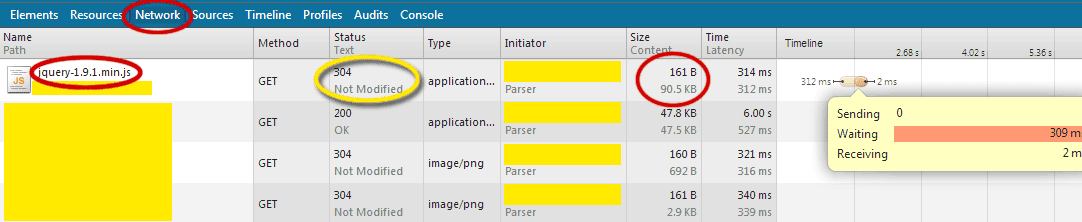
Please take a look of the following network performance of a JQuery in a web page. I'm using a slow connection. Pardon me. :)


Do note that the size of jquery-1.9.1.min.js is around 90kB. For slow connections, it is a burden for a web page to loaded with it. But for a fast internet network, the size is acceptable. Please bear in mind that for public internet facilities, the network could be crawling if many of the users are watching video streamed at the same time.

And here's the good news. Browsers nowadays will be able to cache the JQuery library and reuse it when any web pages call for it. Since many web pages (I can almost assume almost all web pages) are using it, the browser most likely won't even need to reload the library when your web pages call for it. Here's the proof of what happened when I reloaded the same web page the 2nd time:


The news gets even better if you load from Google API server. As you can see the library is somewhat "compressed" thus reducing the size to merely 32kB.


My conclusion is that it depends on your reliance on the handy library. If your task to be performed can be easily replaced by simple Javascript, avoid including the library. Who knows somebody might be running your web page the first time without a cache in the browser after having the cache cleared or on a newly installed browser. If the tasks to be performed on a web page are complicated and hard to be replaced by conventional Javascript or the scripts will be too long, go for it!

Read More »

Sunday, December 30, 2012

Is It The End of Javascript?


Since almost all of our javascript codes can be replaced by jQuery equivalent, do we still need Javascript?

The answer is yes and no. Yes, if you want to place dynamic HTML content in a controlled page such as Ebay. Ebay doesn't allow the call to an external javascript such as the jQuery library. You have no choice but to switch back to conventional javascript for actions.

For me, I would encourage the use of conventional javascript for beginners. Then switch it to jQuery after learning the basics of dynamic HTML.

There is not much difference between javascript and jQuery in terms of speed. But when it comes to coding, jQuery can save us many lines of codes especially when it comes to traversing down the DOM stucture.

So jQuery or javascript? I think both. First, grasp the basics of javascript and switch to jQuery once you are comfortable with the basics of DOM structure.

Read More »

Sunday, December 9, 2012

jQuery: Dim an Entity and Hide it

Make sure you call the jQuery library before running any jQuery functions. Either library version is fine, Google or jQuery Foundation. The following shows the code to dim the myDiv to 0.1 opacity within 500ms. After that, hide the DIV:


$('#myDiv').fadeTo(500, 0.1, function() {
  $('#myDiv').css({visibility: "hidden"});
});


If you straight away animate the opacity to 0 without hiding the DIV, the DIV will stay there although it is not visible nor it is hidden. If the DIV is another layer, it is recommended to hide it or it could cause some interactivity problem as it may cause the links below the DIV not being able to interact with the user.
Read More »

Sunday, August 26, 2012

jQuery toggle() not working?

I just found out that toggle() is not working with the JQuery version I've been using. I am using 1.72 from this link. After switching to version 1.80, I now can lay back a bit by enjoying the convenience of toggle() function which requires many lines of codes if using javascript to control the visibility of an element. Silly me. ;)
Read More »

Monday, November 21, 2011

Use JQUERY to blink Texts


<script src="http://ajax.googleapis.com/ajax/libs/jquery/1.6.4/jquery.min.js"></script>
<script>
function startBlink(){
window.blinker = setInterval(function(){
if (window.blink) {
$('.blink').css('color','black');
window.blink=false;
}
else {
$('.blink').css('color','white');
window.blink = true;
}
},500);
}

startBlink();

</script>

...
<span class="blink"> Your texts here! </span>


This jquery assumes your background color is white and text color is black. You can change the appearance accordingly to suit your need. The interval is set at 500ms. Adjust the timing accordingly.
Read More »

Wednesday, October 5, 2011

About AJAX, JQUERY, JSON, Microsoft AJAX

Ever since facebook embraces AJAX, the popularity surged.

Yahoo and Google started this game and it is good. Microsoft AJAX is having compatibility problems with browsers and JQuery took the center stage.


I summarize the new trends as below so that it's easier to understand:

AJAX - HTML direct connection to server without refreshing a page
JQuery - Advanced Javascript codes to manipulate CSS and AJAX connection/data
JSON - An alternative to XML data format. XML is harder to use.
Microsoft AJAX - JQuery can replace it easily due to its wide compatibility.


JQuery is the winner as it can manipulate CSS and run AJAX stuff. Its partner, JSON, can easily replace XML due to its compatibility with browsers and programming languages. But their concept is all about associative arrays or hash tables. Please don't let the fancy name scare you.


The above shows the difference between "AJAX"ing with JSON and XML.

JSON is very Google/Yahoo feel whereas XML is very Microsoft feel. Hope this is easier to remember.
Read More »

AJAX Using JQuery and PHP to Check Availability of User Name

Again, I compiled these codes from several sources and it's hard to give credit to all of them as some of them I only use several lines and some I only use the concept. Many I found are not fully working. That's why I want to show you the one that's working for me (I'm using PHP5 with Windows 7 via IIS7).

Note: Especially the part JQUERY AJAX pass JSON data to PHP. I don't need to decode the data in PHP. If json_decode() is used, the data will be gone. I really don't know why most examples are decoding the JSON data. But the return of JSON to JQUERY requires the json_encode() to do the job.


The JQUERY CODES:


$(document).ready(function()
{
$("#checkName").click(function(e)
{
userName = $(document.myForm.username).val();

if(userName.length <= 3)
{
$("#display").text("username must be at least 4 characters");
$("#display").css("color","red");
$("#display").css("font-size","11");
}

else
{
$.ajax(
{
type: 'POST',
url: 'CheckUserName.php',
data: {
userName: $(document.myForm.username).val()
},
dataType: 'json',
success: function(response)
{
if(response.found == false)
{
$("#display").text("username is available");
$("#display").css("background-color","lightgreen");
}
else
{
$("#display").text("username is already taken");
$("#display").css("background-color","red");
}
}
});
}
});
});


The HTML:


<form name=myForm>

<input type=text name=username size=35 maxlength=200>

<input type=button name=checkName id=checkName value="Check Availability">

<div id="display"></div>

</form>


The PHP (CheckUserName.php) :


<?PHP

$username = $_POST['userName']; // no need to decode JSON

$dblink = mysql_connect(yourhost, 'yourID', 'yourPassword');

if (!$dblink) {
die('Could not connect: ' . mysql_error());
}

mysql_select_db('yourDBname');

$result = mysql_query("select * from yourMemberNamelist where Username = '$username'");

while ($row = mysql_fetch_assoc($result)) {
$temp = $row["Username"];

}


if ($temp != $_POST['userName']) {
$return['found'] = false;
}
else {
$return['found'] = true;
}

echo json_encode($return);


return;

?>


Again, I put those highlights in red to signify "attention". This is what works for me using IIS7. I'm not sure why there are so many codes out there that is not really working. Maybe it's my IIS7 with PHP5.
Read More »