Monday, August 5, 2013

My Javascript Function to Show UTC Time Zone of Your Browser/Computer


Your computer has its own time zone setting as well as the web host server. Most of the time they are quite different. United States alone has three different time zones.

It is crucial to get the time zone offset off the browser than the server as the time zone is something personal rather than a server sitting on a fixed location that tells nothing about the visitors possibly from the other side of the globe.

Here is a simple Javascript function to get the UTC time zone offset of your browser:

function getBrowserUTCTimezone() {
   x = new Date();
   return x.getTimezoneOffset()/-60;
}


Please note that the offset returned by the Javascript function getTimezoneOffset() will be divided by -60. Why negative? I'm not so sure. The invert of the number seems to give the right offset every time.
Read More »

Sunday, August 4, 2013

JQuery Close-Up: Is it a Good Idea?


JQuery popularity in web development nowadays is similar to Facebook in social network. Developers and programmers love to use it.

The coding is simple and brisk but most people use it just to perform simple tasks on the web pages such as changing the DOM element styles, ie. color, opacity and location.

Many use it to perform tasks that can be easily emulated in conventional Javascript and I think it is over-killing. I now dig a bit digger into JQuery and see if it is worth to have it on your web pages.


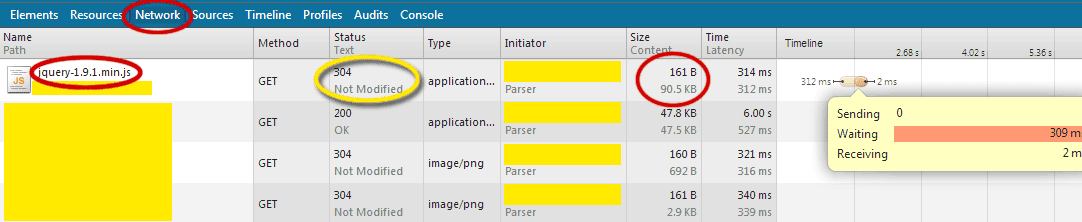
Please take a look of the following network performance of a JQuery in a web page. I'm using a slow connection. Pardon me. :)


Do note that the size of jquery-1.9.1.min.js is around 90kB. For slow connections, it is a burden for a web page to loaded with it. But for a fast internet network, the size is acceptable. Please bear in mind that for public internet facilities, the network could be crawling if many of the users are watching video streamed at the same time.

And here's the good news. Browsers nowadays will be able to cache the JQuery library and reuse it when any web pages call for it. Since many web pages (I can almost assume almost all web pages) are using it, the browser most likely won't even need to reload the library when your web pages call for it. Here's the proof of what happened when I reloaded the same web page the 2nd time:


The news gets even better if you load from Google API server. As you can see the library is somewhat "compressed" thus reducing the size to merely 32kB.


My conclusion is that it depends on your reliance on the handy library. If your task to be performed can be easily replaced by simple Javascript, avoid including the library. Who knows somebody might be running your web page the first time without a cache in the browser after having the cache cleared or on a newly installed browser. If the tasks to be performed on a web page are complicated and hard to be replaced by conventional Javascript or the scripts will be too long, go for it!

Read More »

Modifying Your ASP Code to ASPX VB.Net

This could have been a very old topic as ASP (VB) has been phased out long ago and VB.Net is almost obsolete compared with C#. Although VB and VB.net are using the same programming language, the way they work on a web page is vastly different.

Anyway, let's go with the fun of migrating from one programming environment to another.

ASP (VB)

<%
.
.
Dim orange
orange = "apple"
.
.
.
%>

<html>
<body>
.
.
...<%=orange%> . . .
.
.
.
</body>

</html>


ASPX (VB.Net)

<%@ import Namespace="System.IO" %>
<%@ Page Language="vb" Debug="true" %>

<script language="vb" runat="server">

Private orange as String

Sub Page_Load()
.
.
orange = "apple"
.
.
End Sub

</script>

<html>

<body>
.
.
...<% Response.Write(orange) %> . . .
.
.
.
</body>

</html>


It's hard to get used to the new structure of VB.net initially. But once you get it done error-free a few times, you'll get used to it. There are also some syntax changes in VB.net compared to the old VB such as the use of "+" to concatenate strings together instead of using "&".

Anyway, that's all for now and happy coding!!!

Read More »

Sunday, July 21, 2013

Decompress/Unzip Web Content with Content-Encoding: gzip (using PHP - file_get_contents() and gzinflate())


If you are using file_get_contents() to grab content from the web and process using PHP, you may bump into web contents that are compressed using gzencode.

Here's a solution to decompress those content (simplified for easy reference):

<?php

$qdata = array('http' =>
    array(
     'method' => 'POST',
     'user_agent'=> $_SERVER['HTTP_USER_AGENT']
    )
   );

$context = stream_context_create($qdata);

$data = file_get_contents("http://www.urltograbmystuff.com", false, $context);

$u = gzinflate(substr($data,10,-8));
.
.
.


?>


The trick is to use gzinflate() and do remember to change the URL to your target web address. Process your $u (string that contains the HTML codes of the target) afterwards.

Read More »

Compress External Javascript with gzip in PHP


If you are using an external Javascript, you can compress the content before sending it to the browser using PHP.

Here's the solution (simplified for easy reference):

<?php

error_reporting(0); // make sure it is not reporting any warning that will ruin the output

$js = <<<MYJAVASCRIPT
.
.
.
MYJAVASCRIPT;

// Optional: The following three lines of extra codes are to downsize the Javascript further
//$js = preg_replace('|//[^\r^\n]+(\r\n)|','',$js); // Remove Javascript Comment PC version
//$js = preg_replace('|//[^\n]+(\n)|','',$js); // Remove Javascript Comment non-PC version
//$js = preg_replace('/[\r\n\t]/','',$js); // Remove all the newlines and tabs


$compressedJS = gzencode($js,6); // compression ratio = 6

header("Content-type: application/x-javascript");
header("Content-Encoding: gzip");

echo($compressedJS);


?>


You can check the final compressed size easily using Google Chrome Inspect Element (Network) tool:


Before Compression


After Compression

Please ignore the latency as it varies every time I run the page.

If your javascript/HTML/css size is huge, you can use this method to downsize the codes so that visitors from slow internet connection can benefit from this optimization.

Read More »

Saturday, July 20, 2013

Javascript to Dynamically Change the Image Source of an Element for IE


Just like the problem of changing background color for IE via Javascript, changing the image source requires special treatment as well.

Here's the solution (simplified for easy reference):

Javascript:

var ie = (navigator.userAgent.indexOf("MSIE") != -1);

if (!ie) {
   document.getElementById('MyImageID').src = 'myImageSrcName.jpg';
}
else {
   document.getElementById('MyElemID').innerHTML = '<img src="myImageSrcName.jpg">';
}


HTML:

<span id="MyElemID">
<img src="original.jpg" id="MyImageID">
</span>


This is a simple example of how to change an image source from original.jpg to myImageSrcName.jpg dynamically across major browsers.
Read More »

Javascript to Dynamically Change the Background Color of an Element for IE


You can change the background color easily in Chrome, Safari and Firefox.

But for IE, you cannot change it using the easy way like the other browsers are doing it.

Here's the solution (simplified for easy reference):

var ie = (navigator.userAgent.indexOf("MSIE") != -1);

if (!ie) {
   document.getElementById('MyElemID').style.backgroundColor = "#AABBCC";
}
else {
   document.getElementById('MyElemID').style.backgroundColor = "rgb('AA','BB','CC')";
}


Therefore, if you want to accommodate for all browsers, one needs to think of color as RGB components. You either break up the RGB component to suit IE's requirement or combine RGB components into a string to suit the need of Chrome, Safari or Firefox.

Updated on 4th of August 2013:
It is better to use rgb(170,187,204) instead of rgb('AA','BB','CC') stated earlier.


Read More »

Tuesday, June 18, 2013

How to Suppress Default IIS Error and Display PHP Error Instead?


Ever wonder how to make IIS to show the PHP errors instead of its default "semi" blue-screen error page? So that it is easier to debug your PHP codes?

The answer is simple. Just go to your php.ini (mine is in C:\Program Files (x86)\PHP), change display_errors from Off to On. Reboot your PC. (I've tried just restarting the IIS service, it won't use the new PHP setting yet)

Walla! That simple!

If you want to turn off the error/warning altogether, you can always add "error_reporting = 0;" in your PHP script. For example, PHP script to spit out headers, JSON/XML/Binary data.


This following is the screen capture of the php.ini file:


You need to run this editor as Administrator to save this file as php.ini is a system file.

Read More »