Showing posts with label IIS. Show all posts

Thursday, December 31, 2015

Problem Installing phpBB 3.1 Forum on IIS7 Machine


Anyone having this problem? I tried to install this latest phpBB free web forum into my Windows 7 IIS7 PC but I get this error page:


I then download the earlier version which is 3.0 by clicking on a small button on upper right corner:


After running 3.0 version in the localhost, it works fine:


Anyone having this problem on IIS7 machine before? Maybe switching back to older version is the only solution to this?

Read More »

Sunday, August 31, 2014

Turn PHP Output Buffer Off to Make it Live on IIS


Questions will be raised on why we need such a trivial feature on our machines? The answer is simple, we want to turn our browser into a server console. When we deal with a extremely large database and we use PHP to process it, we really need the live update on the browser to see the progress as it may take a few hours to complete. Especially when it comes to debugging the PHP during the MySQL processing, any problem will be immediately spotted if it is being run live. If not, you may only realize there is a bug in your program hours later. Then you need to wait for a few more hours to find out more about the outcome again. Live update of browsers will come in handy for cases like I mentioned.

The method:

Change two things in php.ini in c:\Program Files (x86) folder.

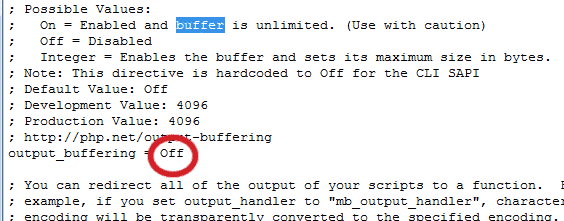
1. output_buffering = Off
2. max_execution_time = 0

NOW REMEMBER TO REBOOT YOUR PC!


There are a lots of recommendations on the web such as changing certain values in IIS (PHP-CGI) and using flush() or ob_flush() in PHP. I've tried them. They don't work.

However, the following codes need to be used to clear the buffer before the PHP can become live:


<?php

ob_implicit_flush();
header("Content-Type: text/html");

for ($i=0; $i < 4150; $i++) {
  echo ' ';
}

// The following is not needed as it is just to make sure your PHP can go live.

for($i=0; $i < 5; $i++){
  echo $i . '<br>';
  sleep(1);
}

?>


Why 4150? I've done some testings on two machines and it seems that the number has to be more than 4096 (default buffer size). 4150 seems to be OK on both machines although one machine can go as low as 4130.


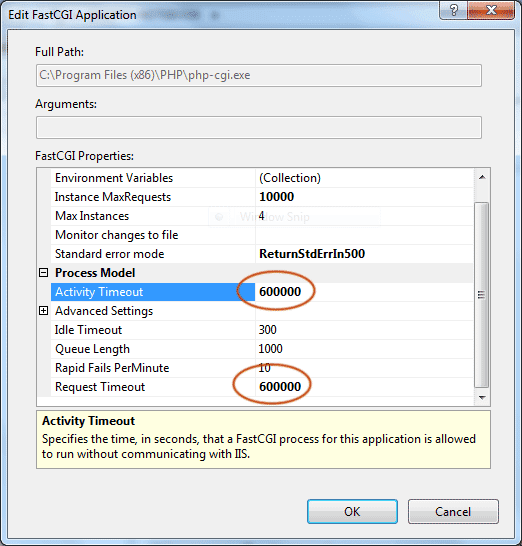
If you running PHP on IIS, you'll need to set your IIS to allow the execution of PHP to run longer. Here are the steps to set the IIS (Windows 7):


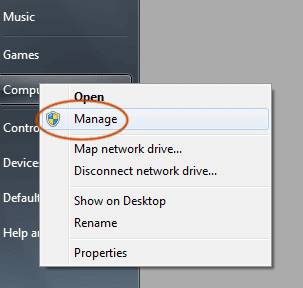
Start->My Computer (Right Click)


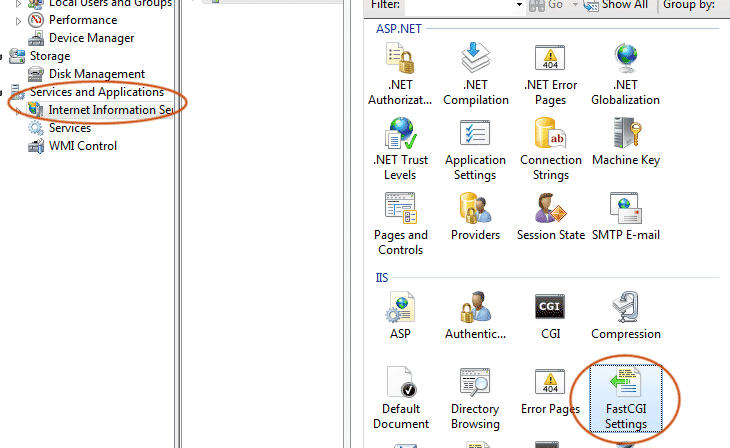
IIS->FastCGI Settings


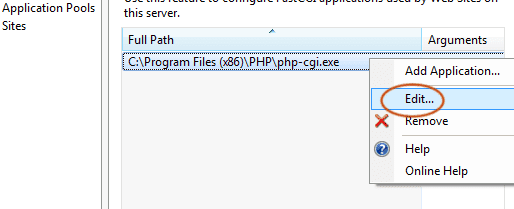
Double Click on the FastCGI exe file or right click -> Edit.


Set the Activity and Request Timeout value to higher number (in seceonds).

Restart your PC.

Read More »

Tuesday, June 18, 2013

How to Suppress Default IIS Error and Display PHP Error Instead?


Ever wonder how to make IIS to show the PHP errors instead of its default "semi" blue-screen error page? So that it is easier to debug your PHP codes?

The answer is simple. Just go to your php.ini (mine is in C:\Program Files (x86)\PHP), change display_errors from Off to On. Reboot your PC. (I've tried just restarting the IIS service, it won't use the new PHP setting yet)

Walla! That simple!

If you want to turn off the error/warning altogether, you can always add "error_reporting = 0;" in your PHP script. For example, PHP script to spit out headers, JSON/XML/Binary data.


This following is the screen capture of the php.ini file:


You need to run this editor as Administrator to save this file as php.ini is a system file.

Read More »

Friday, December 21, 2012

Render Text in PNG Format using PHP GD2 in IIS Environment


The following example won't work if you are running GD version 1 in your PHP server. Some modications are required to make it work.

GD's imagettftext by default cannot set the spacing between characters. If you want to force spacing between characters, you can display each character at a time calculating the spacing your self using a loop.

However, there is one problem setting the spacing: each character's width is different. Therefore, the spacing varies depending on the width of each character.

We use imagettfbbox to measure the width of a character with a given font.

imagettfbbox is troublesome as it is using different requirement to specify the font location in IIS. For Linux environment, you also need to add './' in front of the relative font location. As for IIS, absolute font location is needed. dirname(__FILE__) is used to specify the absolute current script location.

If the font's location is not specified correctly, the error of "Warning: imagettfbbox(): Invalid font filename in ..." will be produced.

Even the location is specified correctly, imagettfbbox gives different result according to the GD version. The following example codes are targeted for GD version 2. If you are using GD version 1, you can modify the codes a bit to make it work.

For imagettfbbox in GD 2 environment, an array of 8 elements are returned. Each data in the array represents a x or y coordinate in the bounding box of a character:


For my case, I use x1 to deduct from x2 to get the width of the character.

Finally, enough said, here are the codes:


<?php

// Make sure you have the font arialbd.ttf in the ./font directory
// webtrick101.blogspot.com

$height = 40;
$width = 80;
$text = "test";
$font_space = 9; // You can change the font space here
$font_size = 19;
$angle = 0;
$x = 10;
$y = $height/2 + 7;
$color = 0; // text color black
$bgcolor = '#ffff00';
$font = 'fonts/arialbd.ttf';
$font2 = './fonts/arialbd.ttf';


$img = imagecreatetruecolor($width, $height);
imagefilledrectangle($img, 0, 0, $width - 1, $height - 1, gd_color($bgcolor));

$textlen = strlen($text);
for ($i = 0; $i < $textlen; $i++) {
 $charwidthArr = imagettfbbox(12, 0, dirname(__FILE__).'\\'.$font, $text[$i]);
 $charwidth = $charwidthArr[2] - $charwidthArr[0];
 imagettftext($img, $font_size, $angle, $x, $y, gd_color($color), $font2, $text[$i]);
 $x += $charwidth + $font_space;
}

header("Content-Type: image/png");
imagepng($img);
imagedestroy($img);


function gd_color($html_color) {
     return preg_match('/^#?([\dA-F]{6})$/i', $html_color, $rgb)
      ? hexdec($rgb[1]) : false;
}

?>


Read More »

Saturday, August 4, 2012

Setting Permission for PHP/IIS Environment Especially When PHP Temporary File Facility Is Used

When PHP is run on IIS platform, users will run into the following problems:
  • (A) Files are not able to be written, created, or rewritten on the C:\inetpub\wwwroot\ directory.
  • (B) PHP uploaded temporary file will not be able to be written and this results in file upload problem. For example, $_FILES["FileID"]["tmp_name"] will not be able to be written.
  • (C) PHP tmpfile() command will fail.
In order to solve this problem, permission on the windows directory should be set correctly. For Linux, it's simple. For windows, it's a bit tricky. You can set the permission on IIS/Windows system using these steps:


  1. Go the folder you want the permission changed to IIS/PHP friendly settings. Right click on the folder and select Properties.


  2. Select the Security Tab.


  3. Click on Edit as indicated above. (There's no need to select Group or User at this point)


  4. Refer to the screen capture above, select Users(YourComputerName\Users). Then check the Full Control Allow and then click on Apply.
  5. Repeat Step D above but this time, select IIS_IUSRS(YourComputerName\IIS_IUSRS) (4). Then as in step D, check the Allow for Full Control (2) then Apply (3). Press OK and then OK again.
You now have set a loose permission for IIS/PHP to perform file operations on the folder you just fine-tuned above. My recommendation for the permission settings may be too loose for some. It's more meant for the PC or notebook in which you are only one who can access to the files. Now in order to solve (A)&(B) problem above, you just need to select the target folder to be granted full permission and repeat the steps above. In order to solve problem (C) above (tmpfile() not working), you need you loosen the C:\WINDOWS\Temp permission. As for problem (B), you also need to check out the phpinfo() by adjusting the PHP.ini so that you see where your temporary is:


You can use the search of 'tmp' and you'll find it in the first search result. Then set the php.ini according to your need. You can also set it to C:\WINDOWS\Temp but you need to grant the permission for PHP to store the temporary file here.
Read More »

Wednesday, October 5, 2011

PHP fwrite/fputs Newline Problem in IIS7

The problem I encountered is that I couldn't write a newline to the file under PC environment.

Then I tried this and it worked:


fwrite($fh, "My Text...\r\n");


Instead of just \n, I need to have the \r\n pair under PC environment. No such issue using PERL under PC. Weird.
Read More »

Wednesday, December 1, 2010

Server Error: HTTP Error 500.19 - Internal Server Error

It's been a while since my last posting. Busy, busy, busy!

Anyway, while installing IIS to my notebook with Windows Vista, I got this Error 500.19. This problem did not pop up during my installation on a Windows 7 PC.

Here's the solution:

I just added a IIS_IUSRS user to the root folder of the IIS, everything is fixed!

Before this, one needs to remember to turn of the Apache if you happen to run it and got a message of access problem to the directory of your web files.

Good luck everyone and I'm glad to be back!!!


Update: Now I get this problem:

Microsoft JET Database Engine error '80004005'

Unspecified error

/Default.asp, line 55
Read More »